Coin Tavern Controls & UI Flow
Mouse-first tavern navigation — flips, shops, relic drafts, and how to confirm your bindings in-game.
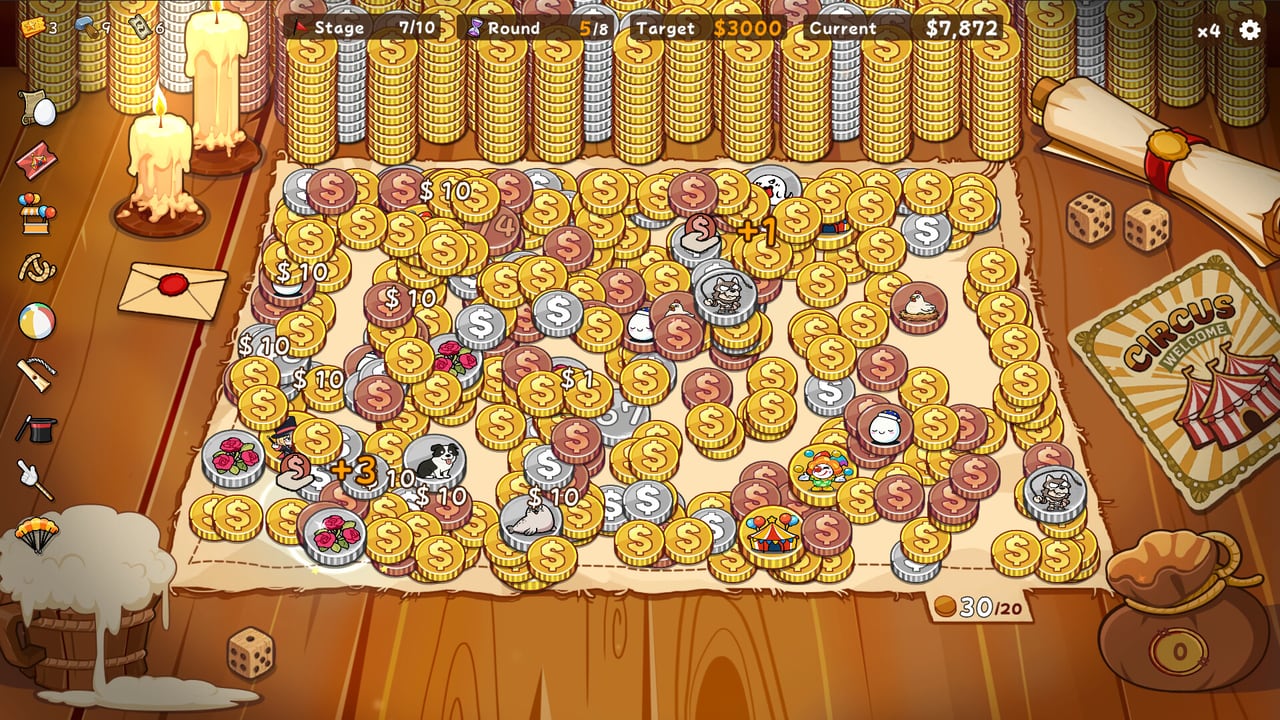
Coin Tavern is built around a tavern UI you click through, not a third-person action game with complex combat inputs. You flip coins, read results, spend at vendors, and confirm debt payments through menus and board interactions. Woven Dream Isle released the full Steam build in July 2026 after a demo that already showcased the same click-driven loop. This guide describes how control flow typically works so new players orient quickly — without inventing keybinds that may differ on your machine or change in a patch.
Important: open the in-game options or settings menu after your first launch to see the current control bindings for your build. This wiki describes common UI actions; your exact keys or remaps live in that menu.
Mouse-First Gameplay
Most players spend the majority of a run using the mouse:
- Selecting coins on the board or in your hand when a flip is available
- Confirming flips or advancing the round when the game prompts you
- Clicking shop offers — coins for sale, upgrades, removals, or refresh actions where available
- Choosing relics from draft screens after clearing stage debt
- Navigating tavern menus between rounds and stages
The board presents your coin deck’s draw each round. You interact with individual coins to trigger flips; outcomes resolve with heads-or-tails feedback and faction effects. There is no aim-and-shoot layer — precision means clicking the correct coin at the correct time in the round order.
If a coin supports reflip, jump, or chain effects, the UI usually surfaces follow-up choices as buttons or highlighted coins. Read tooltips before confirming; mis-clicks waste flips in a resource-limited round.
Keyboard Role
Keyboard input may handle menu navigation, confirm/cancel, speeding through resolved animations, or UI shortcuts depending on what Woven Dream Isle mapped for PC. Because bindings are not standardized across all roguelike deck-builders, do not assume Space equals confirm or R equals reroll without checking options.
Reasonable expectations for keyboard support in a UI-heavy indie title:
- Enter or Space may confirm highlighted choices
- Escape may back out of nested menus
- Number keys might select shop slots or relic options if the developer assigned them
None of the above is guaranteed until you verify in settings. After patches, revisit the menu — rebinding support or new shortcuts sometimes arrive quietly in changelogs listed on What’s New.
Typical Run Flow Through the UI
Understanding screen order prevents panic when debt deadlines approach:
- Stage start — debt target and round budget display; note them before flipping.
- Round loop — draw coins, spend flip allowance, resolve payouts and triggers.
- Between-round breaks — optional shop or event screens; spend tickets, hammers, or gold here when offered.
- Stage end — pay debt from your cash pool; failure ends the run.
- Relic draft — pick one passive modifier before the next stage loads.
The How to Play guide explains why each step matters economically. Controls-wise, your job is to move forward deliberately — confirm payments, do not double-buy shop items by spam-clicking, and read whether a button commits gold or merely previews an offer.
Shop and Upgrade Navigation
Shop screens layer multiple actions: buy coins, remove coins, upgrade with hammers, spend tickets, and sometimes refresh inventory. Each action should show a cost before confirmation. Hover or click once to inspect a coin’s faction tag — Humans, Monsters, Beasts, or Machines — and effect text before purchasing.
Community reports during the demo mentioned occasional confusion around shop refresh or relic shop behavior. Treat those as player anecdotes, not guaranteed current bugs. If an offer looks stale after a refresh, note what you clicked and check Steam discussions or patch notes before assuming your run is broken.
For spending strategy beyond button clicks, read Shop and Tickets and Beginner Tips.
Relic Draft and Debt Payment Screens
After a successful stage, the relic draft presents a small set of passive bonuses. Click a relic to preview, then confirm your pick. Relics persist for the run unless an effect removes them — there is rarely an undo.
Debt payment is a hard gate. The UI should show required cash versus your pool before you commit the final round. If payment fails, the run ends immediately. Controls cannot save a miscalculation; pacing saves you. See How to Beat Stages for forecasting.
Accessibility and Comfort Tips
Coin Tavern’s pace is turn-based, which helps players who prefer slower input. Still:
- Increase UI scale or resolution in system display settings if text feels small — the game may not expose a separate text slider.
- Use mouse tooltips to learn faction synergies before committing flips.
- Pause mentally between shop purchases; mis-clicks cost tickets and hammers you cannot recover on that screen.
If controller support exists in your build, Steam Input or the in-game options page will list it. Do not assume full controller parity on day one without verification.
What to Learn After Controls
Once clicking through a stage feels natural, shift attention to strategy: Deck Management for add/remove timing, How to Combo for jump and reflip chains, and the Deck Planner for theory outside live runs. Achievements and Collection and Endless cover longer-term goals once the basic UI loop is muscle memory.
Frequently Asked Questions
Quick answers to the most common questions.
Is Coin Tavern playable with keyboard only?
The game is mouse-first, but keyboard shortcuts may exist for menus and confirmation. Check the in-game options menu for your current bindings rather than assuming defaults.
How do you flip a coin in Coin Tavern?
During a round, select an available coin on the board or in your hand and confirm the flip through the UI prompt. Exact clicks depend on the current screen layout.
Can I rebind controls in Coin Tavern?
Open the settings or options menu after launch. If rebinding is supported in your build, bindings appear there. Patch notes may add options later.
Why did my shop purchase not work?
Mis-clicks, insufficient gold, or sold-out offers can block purchases. Demo-era community reports also mentioned refresh quirks — verify costs on screen and check Steam news if behavior seems wrong.
Does Coin Tavern support controller input?
Check the in-game options and Steam Input settings for your version. PC UI titles sometimes add partial controller support post-launch.
Where is the debt payment button?
Debt clears automatically at stage end when you have enough cash. Focus on the displayed target during rounds; the UI confirms success or failure at the stage summary.